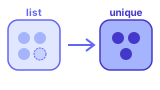
What is List Unique / Dedupe?
A list can contain the same value more than once. Turning a list into its
unique (deduplicated) form keeps each value only once — similar to converting a
multiset into a set, while optionally preserving the order of first appearance.
Remove duplicates
Suppose a shopping list accidentally repeats some items:
- apples, berries, apples, lettuce, berries, peppers, lettuce
After deduplication (first-seen order), you get:
- apples, berries, lettuce, peppers
Each value appears once; later repeats are dropped.
Try it!
Key points
Order preserved
This tool keeps the first time each item appears. Later duplicates are removed
without re-sorting the list.
Case-sensitive
Values are compared exactly as typed. Apple and apple count as different items.
Sets vs lists
In set theory, sets do not contain duplicates. Use this tool when your data starts as a messy list
and you need a clean unique collection.
How it works
Paste a list with repeats. The tool keeps the first occurrence of each value and drops later duplicates.
Comparison is exact and case-sensitive. Ideal before running
set union or intersection on cleaned lists.